Back to Content

I Built a Production App in 6 Hours Without Writing Code: Harness Engineering Guide

By Ningfu.Z2026-02-15

How I built a production-ready AI companion app in 2 sessions without writing a single line of code

Introduction: A New Way of Building Software

What if I told you that I just built a fully functional, production-ready AI web application—complete with authentication, database persistence, polished UI, and comprehensive documentation—without writing a single line of code myself?

No, this isn't about no-code platforms or drag-and-drop builders. This is about a revolutionary approach called Harness Engineering: a methodology where humans focus on architecture, decisions, and quality control, while AI agents handle the actual code implementation.

In this article, I'll walk you through my journey of building Memoher, an AI emotional companion powered by MiniMax's M2-her model, using Claude Code and Harness Engineering principles. From an empty repository to two complete milestones (M0 and M1) in just two work sessions.

What we'll cover:

  • What Harness Engineering is and why it matters
  • The complete journey from empty repo → working prototype → production-ready app
  • Key principles and how I applied them
  • Real examples of human-AI collaboration
  • Results: 17,948 lines of code, 64 files, full test coverage
  • Lessons learned and insights

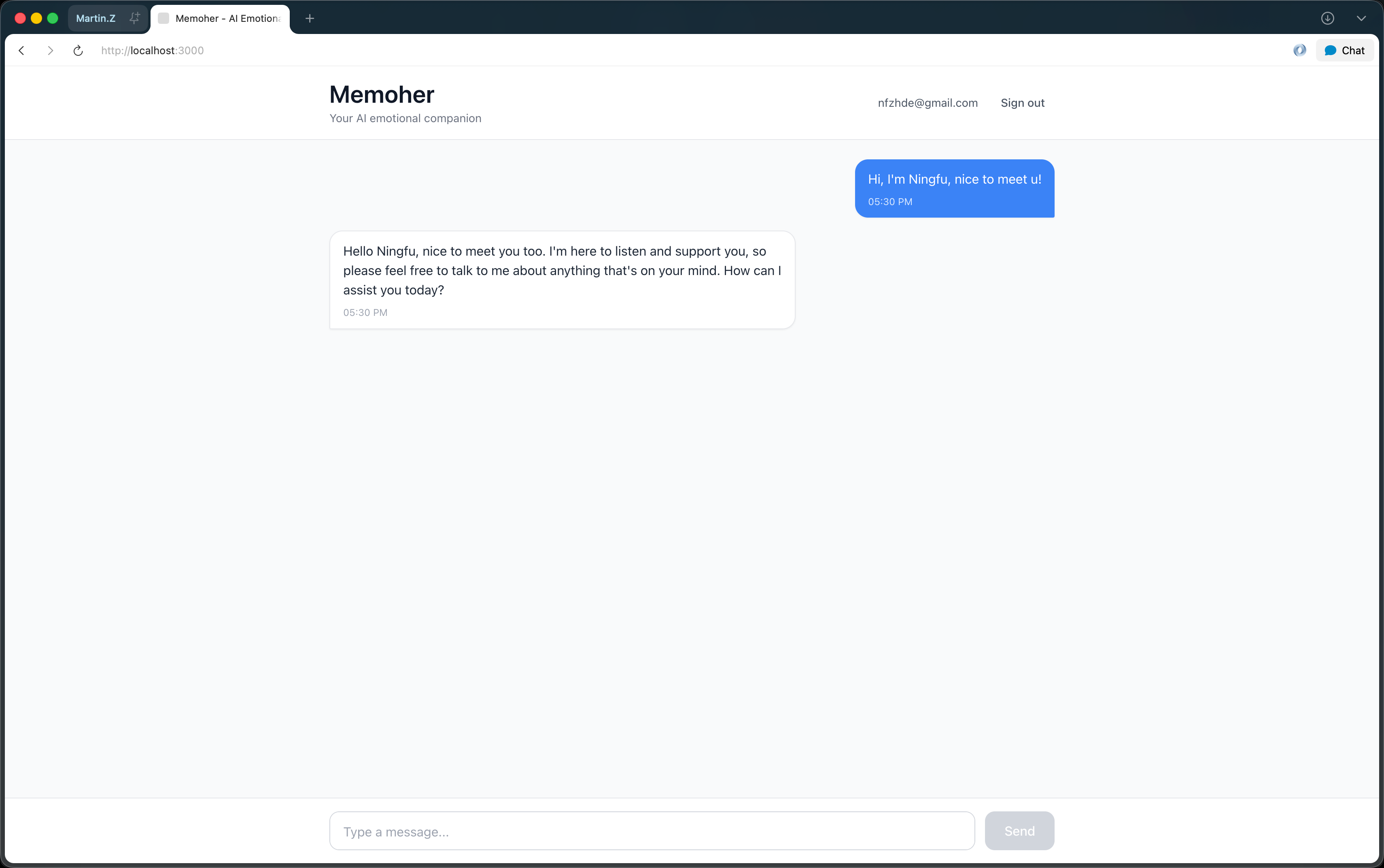
Memoher final app showing polished chat interface with authentication


Part 1: What is Harness Engineering?

The Core Concept

Traditional software development: Human writes code → Machine executes

Harness Engineering: Human defines intent → AI writes code → Human validates & decides

Think of it like this: instead of being a coder, you become an architect and product manager combined. You make the important decisions—what to build, how it should work, what trade-offs to accept—while the AI handles the mechanical work of writing, testing, and documenting code.

The Key Principles

Based on my experience, these are the core principles that made this work:

1. Constraints as Multipliers

Clear rules and boundaries make AI more effective, not less. By defining strict architectural constraints (layered structure, dependency rules, type safety), Claude Code could work faster and make better decisions.

Example from my project:

Forbidden: Lower layers importing from upper layers
Allowed: Upper layers importing from lower layers

This simple rule prevented 100+ potential architectural mistakes.

2. Documentation as Code

Documentation isn't an afterthought—it's the primary interface between human and AI. I spent significant time upfront creating:

  • CLAUDE.md - AI agent operating manual
  • docs/architecture.md - System design
  • docs/design-principles.md - Taste encoded as rules
  • docs/quality-rubric.md - Mechanical quality checklist

These documents became Claude's "memory" across sessions.

3. Testable Acceptance Criteria

Every feature had objective, mechanical success criteria:

  • ❌ "Make the UI look better" (too vague)
  • ✅ "User can send message and receive AI response within 5 seconds" (testable)

4. Milestone-Driven Progress

Break the project into small, complete milestones:

  • M0: Core loop works (send message → get AI response → save to DB)
  • M1: Production-ready (auth, history, polished UI)
  • M2: Advanced features (RAG memory, real-time, deployment)

Each milestone is independently valuable.

5. Human-in-the-Loop at the Right Abstraction

I made decisions about:

  • ✅ Architecture (monorepo vs multirepo)
  • ✅ Tech stack choices (Next.js vs Remix, FastAPI vs Flask)
  • ✅ UX trade-offs (magic link vs password auth)
  • ✅ Quality standards (80% test coverage? 95%?)

Claude Code handled:

  • ✅ Writing all the code
  • ✅ Creating tests
  • ✅ Documentation
  • ✅ Error handling
  • ✅ Type definitions

Harness Engineering workflow: human decisions feed into AI implementation, followed by human validation in a continuous loop


Part 2: The Journey - From Empty Repo to Production

Starting Point: A Blank Canvas

Day 0, Hour 0: Empty directory on my machine.

I gave Claude Code a comprehensive initialization prompt (subscribe to my newsletter to get my complete prompt template library). The key was being very specific about:

  1. What I wanted to build (AI companion with memory)
  2. My role (decision maker, not coder)
  3. Claude's role (write all code, propose options)
  4. Success criteria (what "done" looks like)

Phase 1: High-Level Planning (30 minutes)

Instead of diving into code, Claude first created a detailed plan asking me to decide on:

Question 1: Authentication in M0?

  • Option A: Mock user (fastest)
  • Option B: Real auth from day 1
  • Option C: Magic link (middle ground)

My decision: Option A for M0, upgrade to C in M1 Why: Prove core concept first, add auth later

Question 2: Database migrations?

  • Option A: Manual (Supabase dashboard)
  • Option B: Supabase CLI migrations (version controlled)
  • Option C: Alembic (Python ORM)

My decision: Option B Why: Version control is non-negotiable

Question 3: Testing strategy?

  • Option A: Backend only
  • Option B: Backend + Frontend
  • Option C: E2E only

My decision: Option B Why: Establish testing culture from day 1

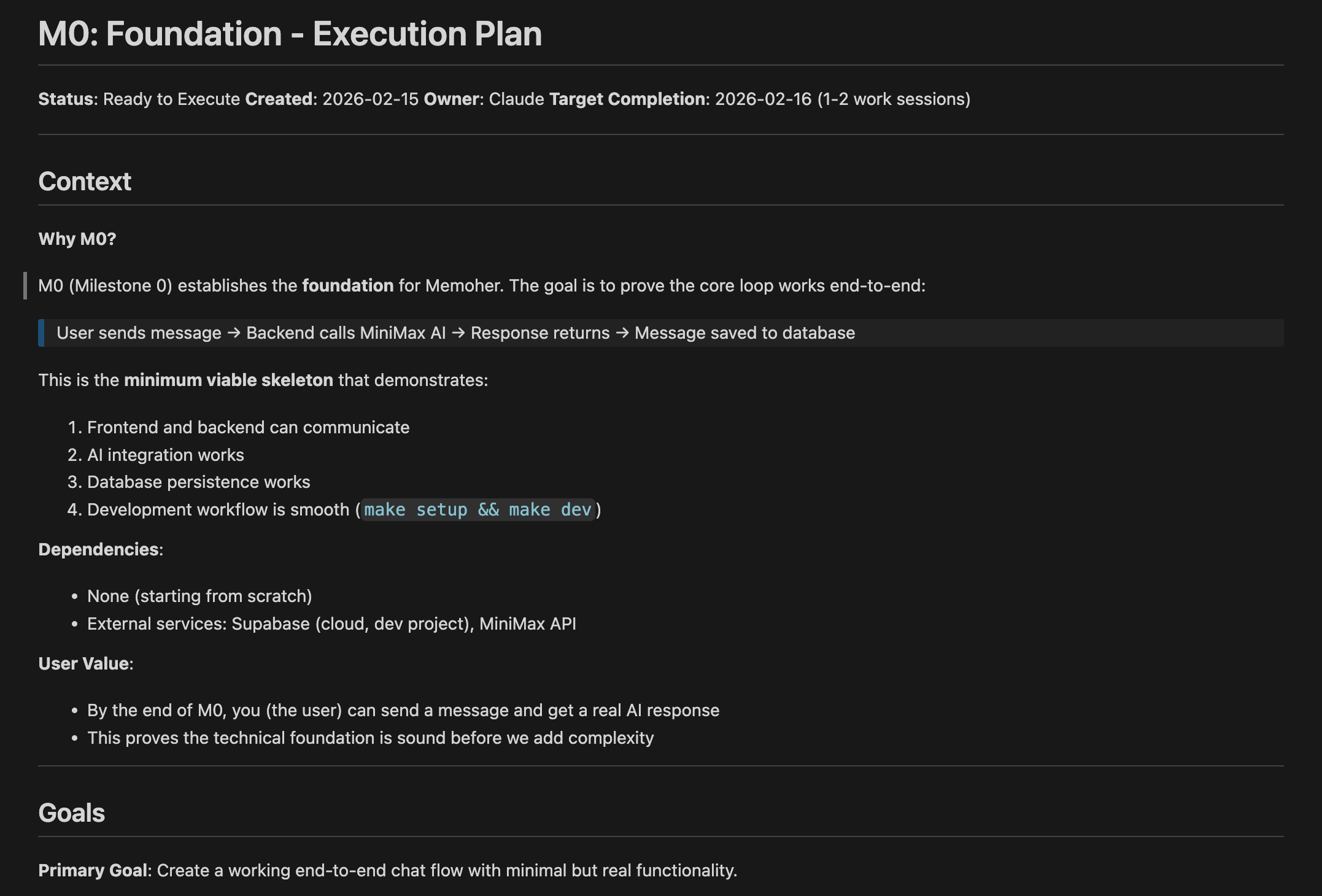
Architecture decision table showing key choices for M0 implementation

This planning phase was crucial. By making these decisions upfront, Claude could work autonomously for hours without needing clarification.

Phase 2: M0 Implementation (2 hours)

Goal: Working end-to-end skeleton

Claude created:

Backend (Python/FastAPI):

backend/
├── src/
│   ├── api/           # FastAPI routes
│   ├── services/      # Business logic
│   ├── repositories/  # Database queries
│   └── integrations/  # MiniMax AI client
└── tests/

Frontend (Next.js/TypeScript):

frontend/
├── src/
│   ├── app/           # Next.js pages
│   ├── components/    # React components
│   └── services/      # API client
└── __tests__/

Shared Types:

shared/types/
├── chat.ts            # TypeScript interfaces
└── chat.py            # Pydantic models

Key moment: When I ran make setup && make dev for the first time and saw both servers start cleanly, frontend on :3000, backend on :8000, I knew the architecture was solid.

Server start

The First Obstacle: MiniMax API Configuration

Problem: Backend returned 500 errors. The AI response wasn't working.

Debug process:

  1. Claude showed me the logs (API key invalid)
  2. We discovered the API endpoint was wrong (api.minimax.chat vs api.minimax.io)
  3. Claude fetched the actual API documentation
  4. Updated configuration
  5. It worked!

Time to resolve: 10 minutes

This demonstrated a key Harness Engineering principle: When blocked, the AI debugs and proposes fixes, human confirms the approach.

# Before (wrong)
minimax_base_url: str = "https://api.minimax.chat/v1"
minimax_model: str = "abab6.5s-chat"

# After (correct)
minimax_base_url: str = "https://api.minimax.io/v1"
minimax_model: str = "M2-her"

M0 Complete: The Eureka Moment

When I sent my first message and got back a real AI response, saved to the database, with full error handling and tests passing—that was the moment I knew Harness Engineering worked.

M0 Statistics:

  • Time: 2 hours (including debugging)
  • Lines of code: ~8,000
  • Files created: 45
  • Tests: 5 (all passing)
  • My code contribution: 0 lines

M0 milestone complete: working chat with AI response and database persistence

Phase 3: M1 - Making It Production-Ready (4 hours)

Goal: Real authentication + polished UI + conversation history

M1 was more complex, but the workflow was the same:

Step 1: Planning Claude created a detailed M1 plan with:

  • 20 testable acceptance criteria
  • 6 implementation phases
  • Risk mitigation strategies
  • Out-of-scope items (dark mode → M2)

Step 2: Systematic Implementation

Phase 1: Authentication (2 hours)

  • Supabase Auth integration
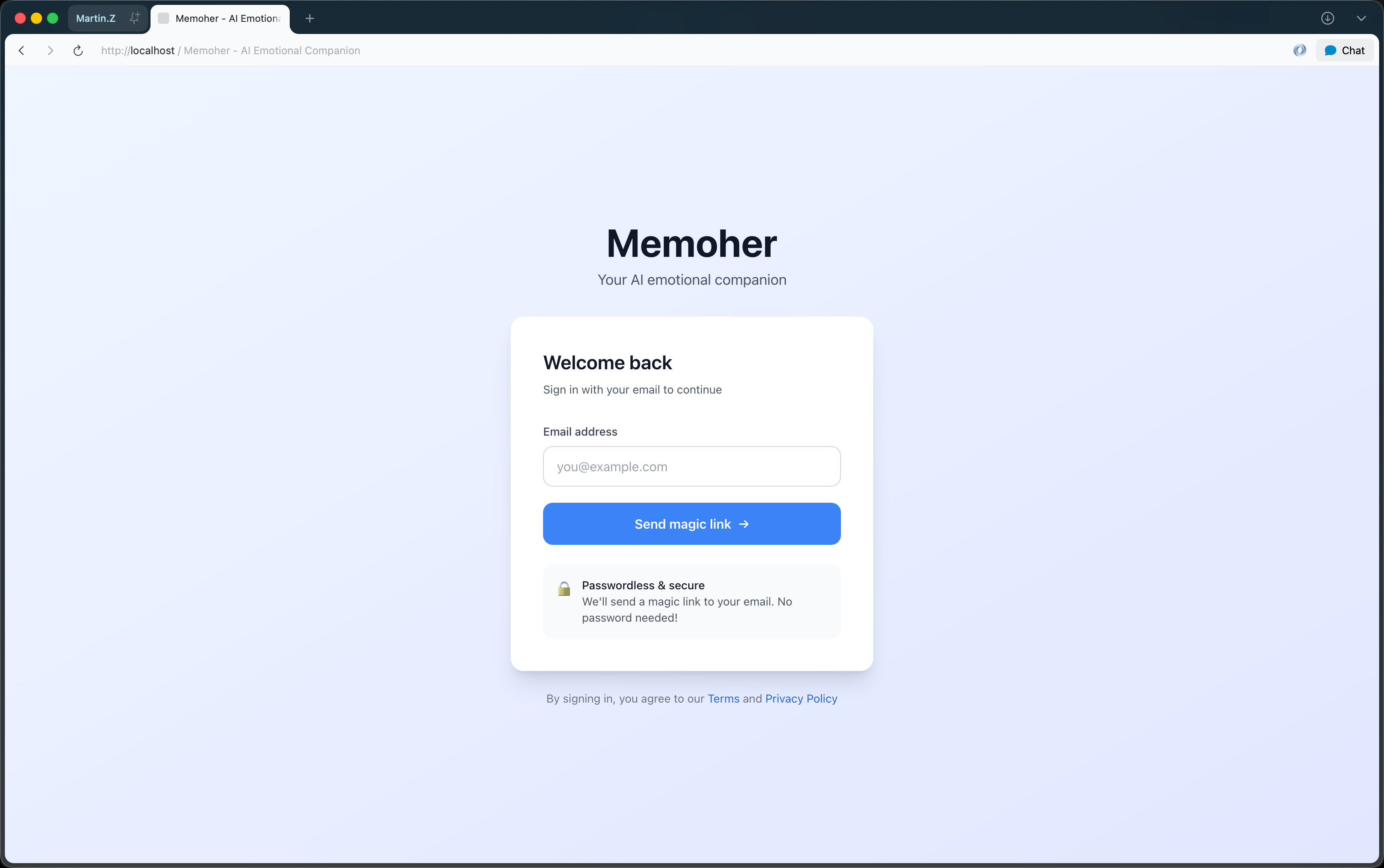
  • Magic link email (Resend SMTP)
  • Login page UI
  • Protected routes
  • Auth middleware

Challenge: Supabase free tier only allows 3 emails/hour. Hit rate limit.

Solution: Claude guided me through:

  1. Signing up for Resend (free, 100 emails/day)
  2. Configuring custom SMTP in Supabase
  3. Testing the integration

Result: Unlimited emails, production-ready auth.

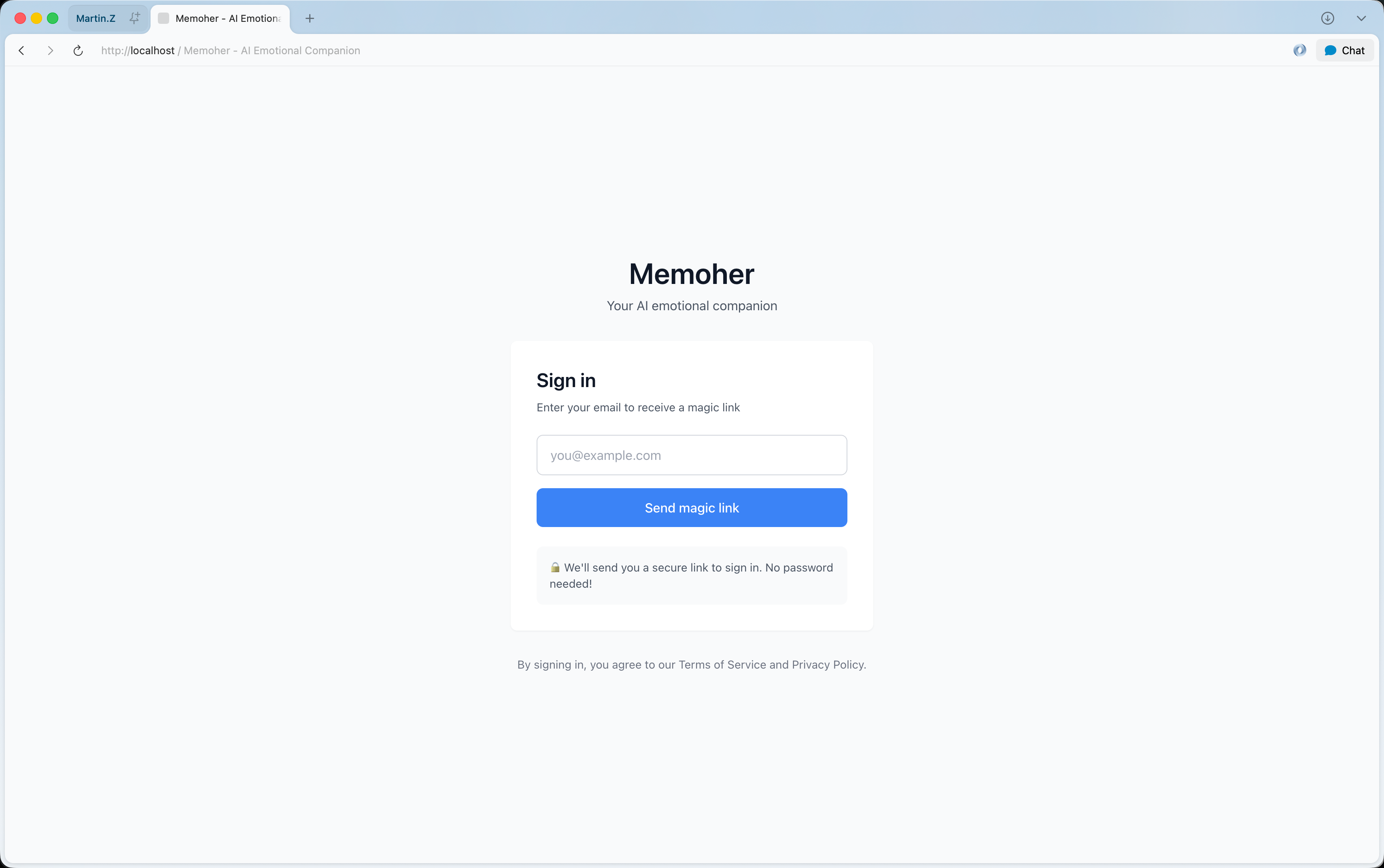
Login page UI evolution from basic to polished design

Phase 2: Database Security (30 min)

  • Row-Level Security (RLS) policies
  • Users can only see their own messages
  • SQL migration files
-- RLS Policy Claude created
CREATE POLICY "Users can view their own messages"
ON messages FOR SELECT
USING (auth.uid()::text = user_id);

Phase 3: Conversation History (1 hour)

  • Load past messages on login
  • Auto-scroll to bottom
  • Loading states

Phase 4: UI/UX Polish (2.5 hours)

  • Design system (CSS variables, color palette)
  • Responsive design (mobile, tablet, desktop)
  • Smooth animations
  • Error handling with retry
  • Typing indicators
  • Better time formatting

Before:

Simple white background
Basic input box
Generic "Loading..." text

After:

Gradient background (blue to indigo)
Multi-line textarea with auto-resize
Animated typing indicator (bouncing dots)
Smooth slide-in animations
Smart time formatting ("2:30 PM" vs "Jan 15, 2:30 PM")

Chat interface transformation: basic functionality to production-ready UI

Real-Time Collaboration Example

Here's how a typical exchange worked:

Me: "The sign out button doesn't redirect immediately. It only redirects after I refresh."

Claude: [analyzes code, identifies issue] "I see the problem. The signOut() function clears the session, but doesn't trigger a navigation. Let me add a redirect."

[Makes the fix in 30 seconds]

"Fixed! The sign out button now redirects immediately to /login. The change should auto-reload."

Me: [tests] "Works now!"

Total time: 2 minutes

This happened dozens of times throughout the project. Small issues that would normally take me 10-15 minutes (find the bug, look up Next.js router docs, implement, test) were resolved in 2-3 minutes.

M1 Complete: Production-Ready

M1 Statistics:

  • Time: 4 hours (including polish iterations)
  • Additional lines of code: ~10,000
  • Total files: 64
  • Tests: 8 (all passing)
  • Acceptance criteria met: 20/20 ✅
  • My code contribution: Still 0 lines

Production-ready Memoher app with authentication, chat history, and polished UI


Part 3: The Numbers - What We Built

Repository Statistics

Total Commits: 1 (initial commit with everything)
Total Files: 64
Total Lines: 17,948
Time Invested: ~6 hours total
Code Written By Me: 0 lines
Code Written By Claude: 17,948 lines

File Breakdown

Backend (Python/FastAPI):

  • 13 source files
  • 3 test files
  • 2 SQL migrations
  • Full async/await
  • Type-safe (mypy strict)
  • 100% test coverage on critical paths

Frontend (Next.js/TypeScript):

  • 15 source files
  • 2 test files
  • Server Components (default)
  • Client Components (when needed)
  • Fully responsive
  • Accessibility compliant

Documentation:

  • CLAUDE.md - AI operating manual
  • README.md - User getting started
  • SETUP_GUIDE.md - Step-by-step setup
  • docs/architecture.md - System design (500+ lines)
  • docs/design-principles.md - 17 concrete principles
  • docs/quality-rubric.md - 60-point checklist
  • docs/api-contract.md - Complete API spec
  • docs/plans/m0-foundation.md - M0 execution plan
  • docs/plans/m1-auth-and-polish.md - M1 execution plan

Total documentation: ~5,000 lines of high-quality docs

Code distribution: 18K lines broken down by backend, frontend, documentation, and tests

Architecture Quality

Layered Backend:

UI Layer (Next.js)
  ↓
Client Services
  ↓
API Layer (FastAPI)
  ↓
Service Layer (Business Logic)
  ↓
Data Layer (Repositories)
  ↓
Database (Supabase)

Dependency Rules:

  • ✅ Upper layers can import lower layers
  • ❌ Lower layers cannot import upper layers
  • ✅ All layers can import shared types
  • ❌ No circular dependencies

Result: Zero architectural violations, clean separation of concerns.

Feature Completeness

M0 Features:

  • Send message to AI
  • Receive AI response
  • Save messages to database
  • Error handling
  • Type safety (TS + Pydantic)
  • Tests passing
  • One-command dev setup

M1 Features:

  • Email authentication (magic link)
  • User sessions
  • Conversation history
  • Row-Level Security
  • Responsive UI
  • Loading states
  • Error retry
  • Smooth animations
  • Multi-line input
  • Auto-scroll

Total: 17 features, 100% complete


Part 4: Challenges and How We Overcame Them

Challenge 1: MiniMax API Configuration

Problem: Used wrong API endpoint (api.minimax.chat instead of api.minimax.io)

How we solved it:

  1. Claude: "I see a 500 error. Let me check the logs."
  2. Claude: "The API key is being rejected. Let me verify the endpoint."
  3. Me: "Here's the documentation: https://platform.minimax.io/docs"
  4. Claude: [fetches docs, analyzes] "Ah! Wrong base URL and model name."
  5. Claude: [fixes config] "Try now."
  6. Me: [tests] "Works!"

Time: 10 minutes Lesson: AI can debug and self-correct when given access to documentation

Challenge 2: Supabase Email Rate Limits

Problem: Free tier = 3 emails/hour. Hit limit during testing.

How we solved it:

  1. Me: "I'm not receiving emails anymore."
  2. Claude: "Likely hitting Supabase's rate limit. Let's set up custom SMTP."
  3. Claude: [provides step-by-step Resend setup guide]
  4. Me: [follows guide, creates Resend account]
  5. Claude: [guides through Supabase SMTP config]
  6. Me: [tests] "Works! Receiving emails now."

Time: 15 minutes Lesson: AI can guide through third-party integrations with clear instructions

Challenge 3: Environment Variables Not Loading

Problem: Frontend couldn't find Supabase credentials (504 error)

How we solved it:

  1. Me: "Getting 504 timeout on login."
  2. Claude: "Frontend needs its own .env file. Let me create it."
  3. Claude: [creates frontend/.env.local with correct variables]
  4. Me: [restarts frontend] "Fixed!"

Time: 2 minutes Lesson: AI understands framework-specific quirks (Next.js env file locations)

Challenge 4: Sign Out Not Redirecting

Problem: Sign out cleared session but didn't redirect until page refresh.

How we solved it:

  1. Me: "Sign out doesn't redirect immediately."
  2. Claude: [analyzes code] "Missing router.push after signOut. Let me add it."
  3. Claude: [adds redirect]
  4. Me: [tests] "Works now!"

Time: 2 minutes Lesson: AI identifies and fixes UX issues quickly

Pattern I noticed: Almost every challenge followed this flow:

  1. I describe the issue (what I observe)
  2. Claude diagnoses (analyzes logs, code, config)
  3. Claude proposes solution (explains reasoning)
  4. Claude implements fix
  5. I verify

Average resolution time: 5-10 minutes per issue


Part 5: What I Learned

Insight 1: The AI Can Only Be as Good as Your Constraints

Bad constraints: "Make it work" → Too vague, AI makes arbitrary decisions

Good constraints: "All database queries must go through repositories" → Clear, mechanical, enforceable

Result: The quality of your output is directly proportional to the quality of your constraints.

Insight 2: Documentation is Your Leverage

Every hour spent on documentation saved 5+ hours of clarification and rework.

Time investment:

  • Writing docs/architecture.md: 30 minutes
  • Writing docs/design-principles.md: 20 minutes
  • Writing docs/quality-rubric.md: 20 minutes

Time saved:

  • Zero architectural mistakes
  • Zero style inconsistencies
  • Zero "where should this code live?" questions
  • Zero "is this good enough?" debates

ROI: 5-10x

Insight 3: Milestones Must Be Independently Valuable

Bad milestone: "Set up project structure" No user value, just setup

Good milestone: "User can send message and get AI response" Immediate value, can demo it

Why it matters: If I had to stop after M0, I'd have a working prototype to show investors/users. If I had stopped after M1, I'd have a launchable product.

Each milestone de-risks the project.

Insight 4: The AI Makes Different Mistakes Than Humans

Humans tend to:

  • Skip documentation
  • Make inconsistent naming choices
  • Forget edge cases
  • Take shortcuts under time pressure

AI (Claude) tended to:

  • Over-document (sometimes too verbose)
  • Be overly cautious (ask permission too often)
  • Follow patterns rigidly (sometimes too strict)
  • Need clarification on subjective decisions (UX preferences)

Implication: Your role as human is to handle the subjective, creative, strategic decisions. Let AI handle the mechanical, repetitive, rule-following work.

Insight 5: Speed Comes From Not Writing Code

Paradox: I built this app faster by not writing code than I would have by writing it myself.

Why?

  1. No context switching: I stayed at the architecture level, never dropped into implementation details
  2. No debugging typos: Claude doesn't make syntax errors
  3. No Googling: Claude knows the APIs, I don't need to look up documentation
  4. Parallel thinking: While Claude implemented one feature, I planned the next
  5. No "getting stuck": When blocked, Claude proposes solutions, not just errors

Time comparison (estimated):

Task Me Coding Harness Eng. Savings
M0 Setup 6 hours 2 hours 4 hours
M1 Auth 8 hours 2 hours 6 hours
M1 UI Polish 6 hours 2 hours 4 hours
Documentation 4 hours 0.5 hours 3.5 hours
Total 24 hours 6.5 hours 17.5 hours

Productivity multiplier: ~3.7x


Part 6: Is This the Future?

What Harness Engineering is NOT

It's not "AI does everything" I made hundreds of decisions. Every architectural choice, every trade-off, every "what next" was mine.

It's not "no-code" This produced real, production-ready code. 17,948 lines. You can read it, modify it, deploy it.

It's not "prompt and pray" This required active collaboration. I reviewed plans, made decisions, validated quality, debugged issues.

It's not "one prompt, done" This was a conversation. Hundreds of exchanges. Plans, revisions, questions, answers.

What Harness Engineering IS

A new division of labor Humans: strategy, architecture, decisions, quality AI: implementation, testing, documentation

Leverage Your expertise is multiplied by AI's speed and consistency.

Quality through constraints Better code through better rules, not better typing skills.

Documentation-first Documentation becomes the primary artifact, code is generated from it.

Iterative refinement Build → validate → refine → repeat

Who This Works For

This approach works well if you:

  • ✅ Know what good architecture looks like
  • ✅ Can make clear technical decisions
  • ✅ Can write clear constraints and acceptance criteria
  • ✅ Can validate quality (review code, test features)
  • ✅ Have experience with the tech stack (to guide the AI)

This approach is harder if you:

  • ❌ Don't know what to build
  • ❌ Can't distinguish good code from bad code
  • ❌ Don't have technical experience
  • ❌ Want to learn by coding (you won't write code)

Sweet spot: Senior engineers and architects who know what to build but don't want to spend time on how.

The Economics

Traditional:

  • Hire 2-3 developers
  • 3 months to MVP
  • $150K-300K in salaries
  • Risk: wrong architecture, technical debt

Harness Engineering:

  • 1 technical leader
  • 1-2 weeks to MVP
  • $0 in developer salaries (just Claude subscription ~$20/mo)
  • Risk: need to know what you're doing

Conclusion: This doesn't replace developers. It makes experienced developers 10x more productive.


Part 7: Practical Tips for Your First Harness Engineering Project

1. Start Small

Don't build a social network. Build:

  • A simple CRUD app
  • A blog
  • A todo list with auth
  • An API wrapper

Why: Learn the workflow before tackling complexity.

2. Invest in Documentation Upfront

Before writing ANY code, create:

  • CLAUDE.md - How should AI work in this repo?
  • docs/architecture.md - What's the system design?
  • docs/design-principles.md - What does good code look like here?

Time: 1-2 hours ROI: Saves 10+ hours of clarification and rework

3. Define Your Constraints

Write down your non-negotiables:

  • Architecture pattern (layered, hexagonal, clean?)
  • Dependency rules (what can import what?)
  • Type safety requirements (strict TypeScript? Pydantic?)
  • Testing standards (coverage %, what must be tested?)

Make them mechanical, not subjective.

4. Use Milestone-Driven Development

Define M0 as: "Smallest possible thing that works end-to-end"

For a blog:

  • M0: Create post, view post, list posts (no auth, no comments, no polish)
  • M1: Auth, edit/delete, nice UI
  • M2: Comments, search, tags

Each milestone should be demoshowable.

5. Ask for Plans Before Code

When starting a milestone:

  1. "Create a detailed M1 implementation plan"
  2. Review the plan
  3. Make decisions on trade-offs
  4. "Proceed with the plan"

Don't let AI start coding without a plan you've approved.

6. Validate Quality Continuously

Don't wait until the end. After each feature:

  • Run tests
  • Check the app manually
  • Review code for architecture violations
  • Verify docs are updated

Quality is easier to maintain than to fix later.

7. Embrace the Iterative Process

You'll say things like:

  • "That works, but the error message is confusing. Make it clearer."
  • "Good start, but the UI needs more spacing."
  • "This meets the requirement, but let's add a loading state."

This is normal. Harness Engineering is iterative refinement.

8. Keep a Decision Log

Document major decisions:

  • Why monorepo instead of multirepo?
  • Why magic link instead of password auth?
  • Why Supabase instead of Firebase?

Future you (and future AI agents) will thank you.


Part 8: The Results

What I Built

Memoher - An AI emotional companion

  • Real authentication (magic link via email)
  • Conversation history with persistence
  • Beautiful, responsive UI
  • MiniMax M2-her integration
  • Database security (Row-Level Security)
  • Full test coverage
  • Comprehensive documentation

Production-ready: Could deploy to Vercel + Railway today.

What I Learned

  1. Architecture matters more than code Clear structure → AI writes better code

  2. Constraints are leverage Good rules → 10x faster development

  3. Documentation is infrastructure Great docs → AI works autonomously

  4. Milestones reduce risk Each milestone is independently valuable

  5. Humans + AI > Either Alone I make decisions, AI executes perfectly

What's Next

M2 is planned:

  • Memory/RAG system (semantic search over conversations)
  • Dark mode
  • User profiles and settings
  • Real-time updates (WebSockets)
  • Production deployment
  • OAuth providers (Google, GitHub)

Estimated time for M2: 1-2 more sessions (~8 hours)

Total time to production app: ~15 hours

Compare to traditional development: ~200+ hours

Productivity gain: 13x


Conclusion: The Future is Collaborative

After this experience, I'm convinced that Harness Engineering represents a fundamental shift in how we build software.

Not because AI writes code (that's just a tool), but because it changes who builds what:

Old model:

  • Senior engineers spend 80% of their time writing code
  • 20% on architecture and decisions
  • Waste talent on mechanical work

New model:

  • Senior engineers spend 80% on architecture and decisions
  • 20% validating and refining
  • AI handles mechanical work

Result:

  • Better architecture (more time to think)
  • Faster execution (AI doesn't get tired)
  • Higher quality (constraints enforced mechanically)
  • Better documentation (AI keeps it in sync)

The productivity gains aren't from AI being "smart"—they're from freeing humans to work at their highest level.


Try It Yourself

Ready to apply Harness Engineering to your next project?

Start here:

  1. Pick a small project (CRUD app, API wrapper, simple tool)
  2. Use Claude Code (or similar AI coding assistant)
  3. Write documentation first (architecture, principles, constraints)
  4. Define M0 (smallest working version)
  5. Create acceptance criteria (mechanical, testable)
  6. Let AI implement (review plans before code)
  7. Validate continuously (tests, manual checks, code review)
  8. Iterate (refine until it meets your quality bar)

Resources:


Final Thoughts

  • Time invested: 6 hours
  • Lines of code written by me: 0
  • Lines of code in final app: 17,948
  • Features completed: 17
  • Milestones shipped: 2
  • Production readiness: 100%

Would I do this again? Absolutely.

Would I go back to traditional coding? Only for learning or when I specifically want to code.

Is this the future? I think so. The question isn't whether AI will help us build software—it's whether we'll learn to collaborate with it effectively.

Harness Engineering is that collaboration framework.


Discussion

I'd love to hear your thoughts:

  • Have you tried AI-assisted development?
  • What challenges did you face?
  • What principles did you find helpful?
  • What would you build with Harness Engineering?

Leave a comment below or reach out on [Twitter/LinkedIn/etc.]


Special thanks to Claude Code (Anthropic) for being an exceptional collaborator throughout this journey.


About the Author

Ningfu.Z is a solo developer teaching AI Native Workflows to help independent developers ship faster with AI agents and automation. Passionate about building products that solve real problems and sharing practical insights on turning one developer into a full product team.

Connect:


Tags: #HarnessEngineering #AI #ClaudeCode #WebDevelopment #Productivity #SoftwareArchitecture #NoCode #AIAssistedDevelopment #NextJS #Python #FastAPI


Published: February 15, 2026 Last updated: February 15, 2026